




Have Questions?
-
Australian Owned & Operated
-
Technical Support
-
Easy Returns
-
fast & Free Shipping
Launch SmartLink C/B V2.0 Super Remote Diagnosis Tool
Vehicle Data Link Connector for Remote & Local Professional Diagnostics
The Launch SmartLink C/B V2.0 is an advanced vehicle data link connector and remote diagnostic service interface developed by LAUNCH for professional workshops, fleet maintenance centers, remote diagnostic engineers, and advanced technicians. Designed on a Linux operating system and equipped with a dual-processor architecture, SmartLink V2.0 enables stable, fast, and secure remote vehicle diagnostics, while also supporting local full-system diagnostics when paired with compatible LAUNCH X-431 tools.
This solution forms the core hardware of LAUNCH’s Super Remote Diagnosis (SRD) System, allowing vehicles to be diagnosed from thousands of miles away through the LAUNCH Remote Diagnosis Reservation Platform.
🔧 Core Hardware & System Specifications
-
Product Name: Launch SmartLink C/B V2.0
-
System: Linux Operating System
-
CPU Architecture: Dual Processor
-
Cortex-A7
-
Cortex-M7
-
-
Memory (RAM): 256MB
-
Storage (ROM): 8GB
-
Display Resolution: 320 × 480
-
Connector Type: DB15 (reinforced for stability)
-
Heat Management: Improved heat dissipation vs SmartLink 1.0
This upgraded architecture ensures faster response times, higher diagnostic stability, and continuous operation during long remote diagnostic sessions.
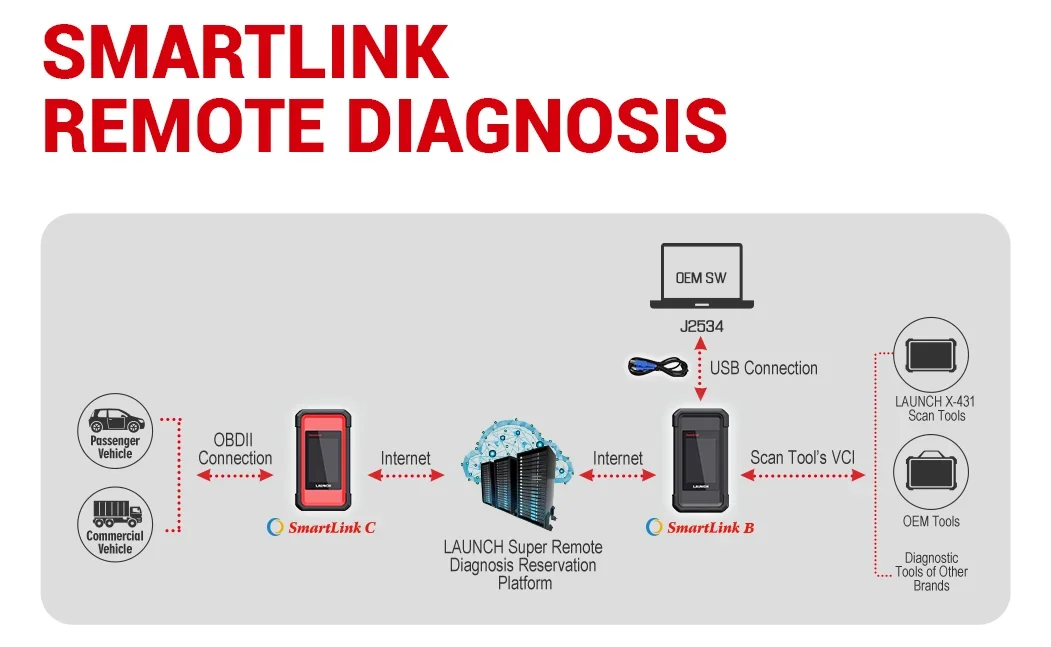
📡 Connectivity & Communication Methods
-
Bluetooth – Wireless connection to diagnostic devices
-
Dual-Frequency Wi-Fi – High-speed, stable internet communication
-
USB – Direct wired connection support
-
Optimized Wi-Fi signal strength compared to SmartLink 1.0
These communication options allow SmartLink C/B V2.0 to function reliably in workshops, mobile repair environments, and remote diagnostic operations.
🔌 Advanced Vehicle Communication Protocol Support
Launch SmartLink C/B V2.0 supports modern and legacy vehicle protocols, including:
-
DoIP (Diagnostics over Internet Protocol)
-
CAN FD
-
CAN 2.0
-
Standard CAN protocols
This makes it suitable for new-generation vehicles, EVs, heavy-duty platforms, and modern ECUs.
🚙 Vehicle Coverage & Application Range
SmartLink V2.0 supports diagnostics for:
-
Passenger vehicles
-
Commercial trucks
-
Buses
-
Construction machinery
-
Agricultural machinery
-
Trailers
-
Ships / marine engines
-
New energy vehicles (EV / hybrid – vehicle dependent)
Engine Diagnostic Coverage Includes (Vehicle Dependent):
Cummins, Bosch, Weichai, Shangchai, Yuchai, Xichai, Chaochai, Yangchai, Quanchai, and more.
🧠 Diagnostic Functions Supported
When used locally or remotely with compatible tools:
-
Full system fault diagnosis
-
Read diagnostic trouble codes (DTCs)
-
Clear diagnostic trouble codes
-
Live data stream monitoring
-
Special functions and service operations
-
Action tests / actuator tests (vehicle dependent)
SmartLink C can function as:
-
Remote diagnosis interface
-
Local diagnosis interface (when paired with supported LAUNCH X-431 tools)
🌐 Super Remote Diagnosis (SRD) System Architecture
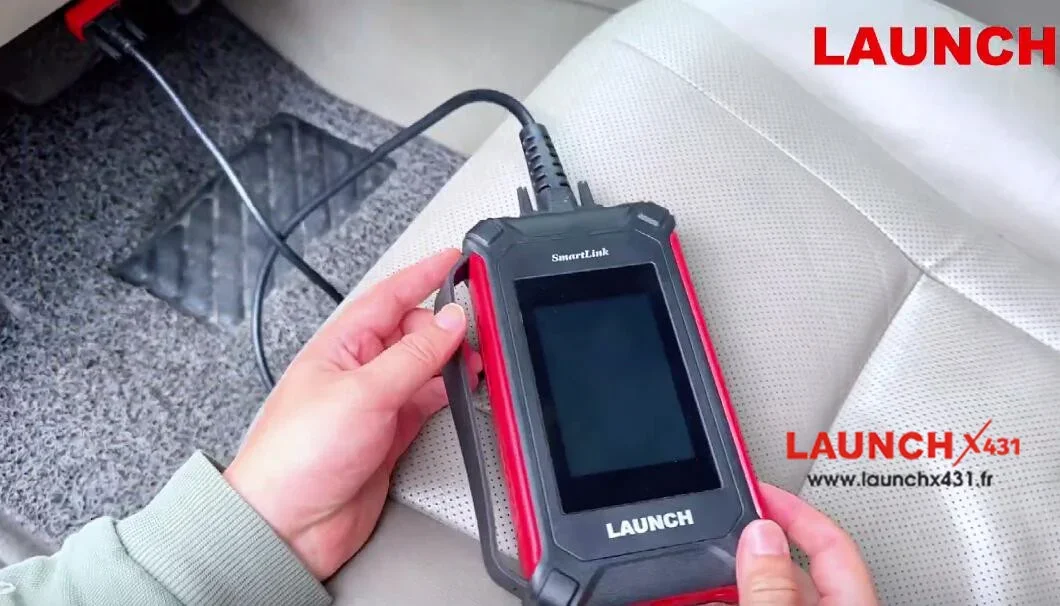
The LAUNCH Super Remote Diagnosis System consists of three components:
🔹 SmartLink C (Client Side)
-
Installed at vehicle location (repair shop or customer site)
-
Connects to the vehicle via OBDII cable
-
Connects to LAUNCH SRD Platform via Internet
-
Requires Launch J2534 Tool installed on PC for platform communication
🔹 SmartLink B (Business / Engineer Side)
-
Used by remote technicians or diagnostic engineers
-
Connects to:
-
Launch X-431 scan tools
-
OEM diagnostic tools
-
Other brand diagnostic tools
-
-
Communicates with SRD Platform via internet
🔹 LAUNCH Super Remote Diagnosis Reservation Platform
-
Allows posting and accepting remote diagnostic requests
-
Connects repair shops with professional remote engineers
-
Enables diagnostics across long distances
🌍 Remote Diagnosis Regional Support Rules
Type 1 Regions (Restricted – Exclusive Provider):
-
USA
-
Canada
-
Mexico
Type 2 Regions (Restricted – Exclusive Provider):
-
Australia
-
Brazil
-
Japan
Type 3 Regions (No Restriction):
UK, France, Spain, Sweden, Switzerland, Netherlands, Germany, Finland, Lithuania, Norway, Italy, Greece, Estonia, Belgium, Portugal, Austria, Denmark, Ireland, Slovenia
Type 4 Regions (No Restriction):
Other countries where asRech is not patented and does not provide local services
Remote diagnosis availability depends on regional platform policies.
🔑 Activation & Subscription Requirements (Very Important)
For X-431 PRO5 / PAD V / PAD VII + SmartLink C:
-
Annual Activation Card (1 Year)
-
OR Renewal Card (Times Cards)
Free 3 remote sessions included with renewal card (valid within 1 year).
Additional connection cards available: 1 / 10 / 20 / 50 sessions.
For SmartLink C (Standalone Use):
-
Annual Activation Card (1 Year)
-
OR Renewal Card (Times Cards)
Activation method differs slightly from bundled X-431 devices.
For SmartLink B:
-
SmartLink B Annual Renewal Card (1 Year)
-
Required to maintain remote diagnosis functionality
⚠️ Activation cards are not included unless specified.
⭐ Improvements Over SmartLink 1.0
-
Stronger Wi-Fi signal performance
-
Enhanced internal cooling and heat dissipation
-
More secure DB15 connector
-
Improved long-term stability during remote sessions
🏆 Why Choose Launch SmartLink C/B V2.0?
-
No advanced diagnostic experience required – access global experts
-
Enables OEM-level diagnostics remotely
-
Reduces travel, downtime, and diagnostic cost
-
Suitable for workshops, fleets, and professional technicians
-
Supports both remote and local diagnostic modes
🔗 How to Create a Remote Diagnostic Appointment (Step-by-Step)
The Launch SmartLink C V2.0 allows technicians and workshops to quickly submit or receive remote diagnostic assistance through the LAUNCH Super Remote Diagnosis Platform.
Standard Appointment Creation Method
-
Click “My Post” and select Create an Appointment
-
You may either:
-
Select a specific expert to schedule the service, or
-
Post a general diagnostic request to available experts
-
-
In the top-right corner, select vehicle details, for example:
-
Brand: Volvo
-
Model: XC60
-
Year: 2018–2022
-
Engine/System: All
-
-
Clearly specify the diagnostic issue to be solved
-
Click Submit to complete the request
Fast Connection Method (Direct Expert Connection)
If you have already contacted an expert in advance, the process is even simpler:
-
Plug SmartLink C V2.0 into the vehicle’s OBD port
-
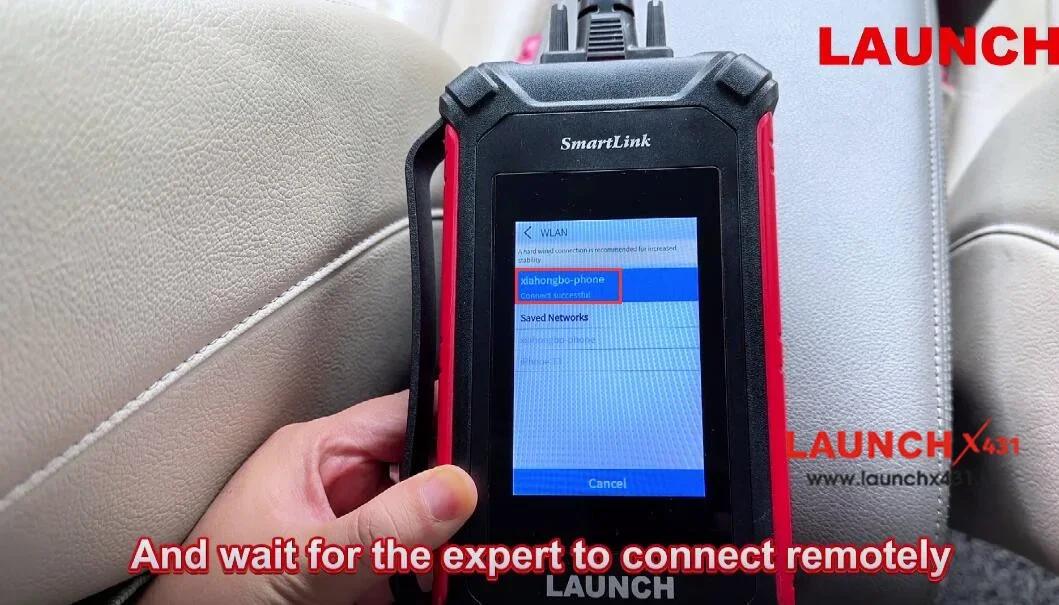
Connect the device to the internet (Wi-Fi or Ethernet)
-
Wait for the device to power on automatically
-
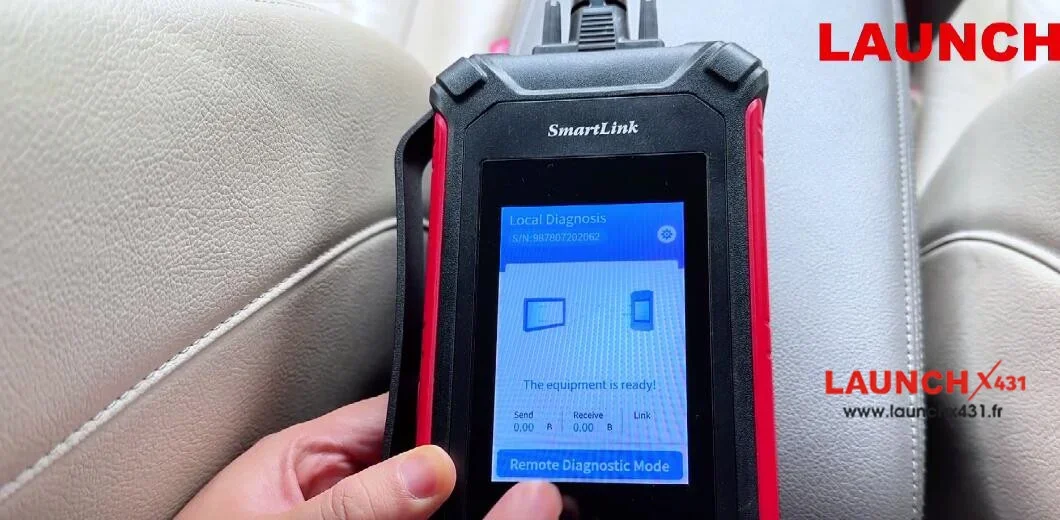
Enter Remote Diagnostic Mode
-
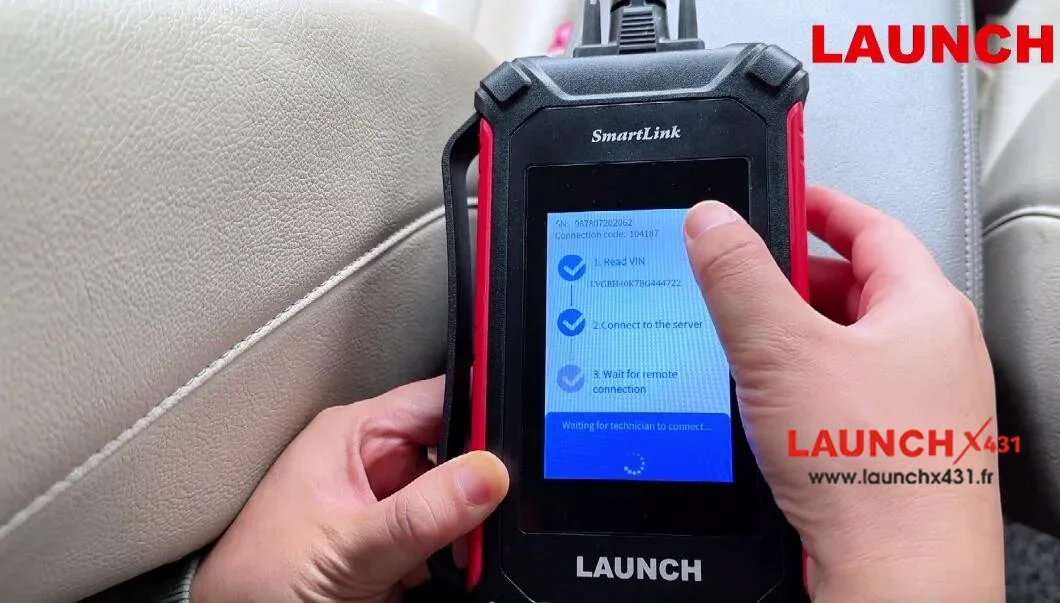
SmartLink C will generate a 6-digit connection key
-
Share this key with the expert
-
The expert connects remotely and begins diagnosis
This method allows immediate remote access without creating a full appointment.
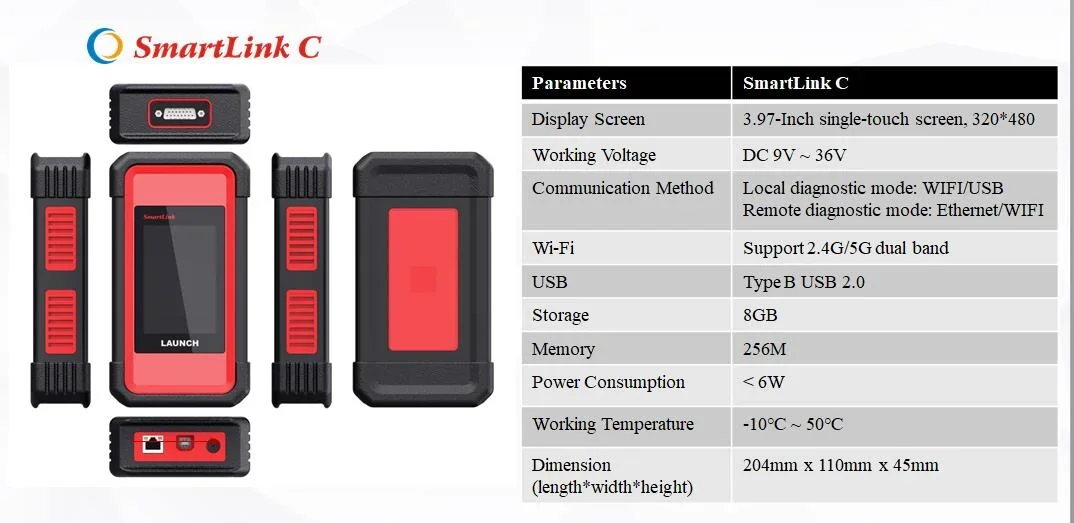
🧠 SmartLink C V2.0 Technical Specifications
Hardware & System
-
CPU: Dual-Core Cortex-A7 + Cortex-M7
-
Operating System: Linux
-
RAM: 256MB
-
ROM (Storage): 8GB
-
Battery: Included (built-in)
Display
-
Screen Size: 3.95″ / 3.97″ TFT
-
Resolution: 320 × 480
Connectivity & Communication
-
Local Diagnosis:
-
Wi-Fi
-
Bluetooth
-
USB
-
-
Remote Diagnosis:
-
Wi-Fi
-
Ethernet (RJ45)
-
-
Wireless:
-
Dual-frequency Wi-Fi (2.4GHz / 5GHz)
-
Bluetooth
-
Power & Physical Design
-
Working Voltage: 9V DC – 36V DC
-
Dimensions: 200 × 110 × 47 mm
External Interfaces
-
USB Type-B
-
RJ45 (Ethernet)
-
OBD II-16
-
DC-IN
🔍 Diagnostic Capabilities & Special Features
-
Full system fault diagnosis
-
Read & clear diagnostic trouble codes
-
Live data stream monitoring
-
Special functions (vehicle-dependent)
-
Action tests / actuator controls
-
Supports advanced protocols:
-
DoIP
-
CAN FD
-
CAN 2.0
-
Designed for passenger vehicles, commercial vehicles, and new energy vehicles, depending on software authorization and regional support.
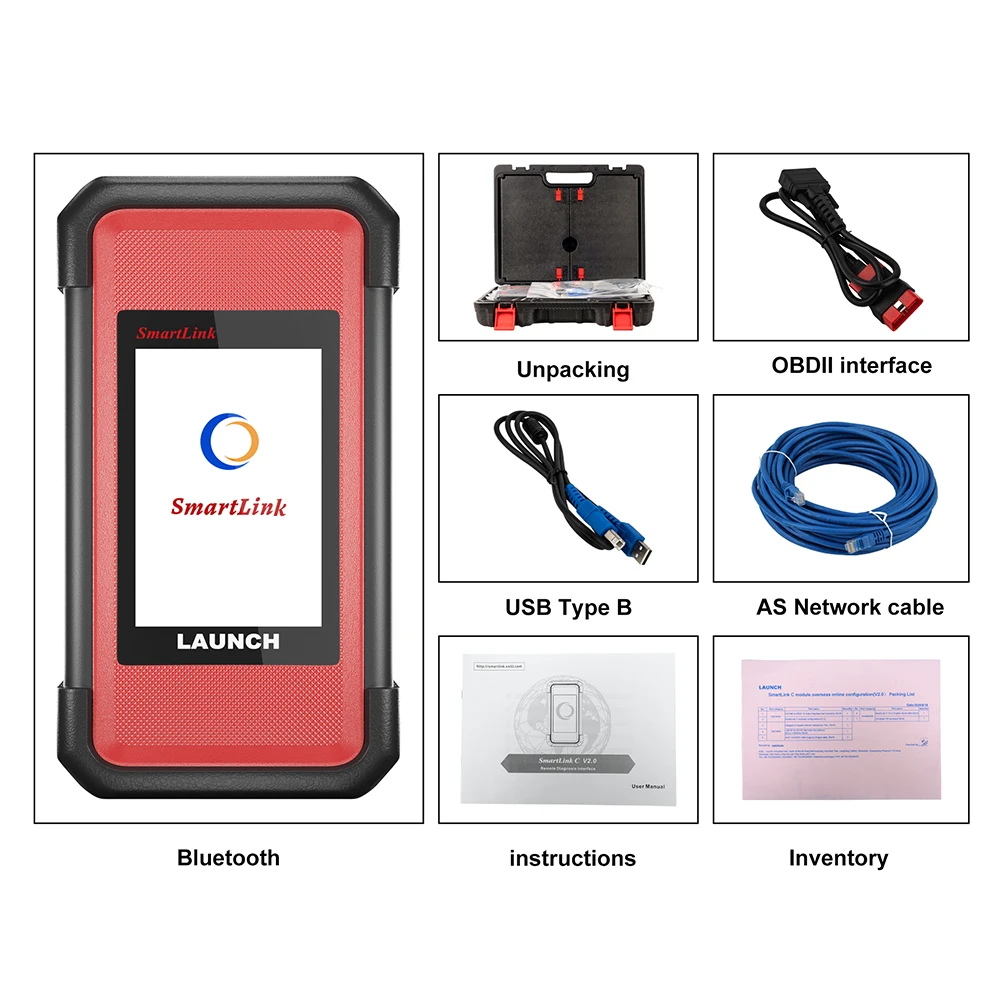
📦 Package Contents (What You Will Receive)
-
1 × LAUNCH SmartLink C V2.0 Main Unit
-
1 × USB Cable
-
1 × Ethernet Cable
-
1 × Main Diagnostic Cable
-
1 × OBD2 Adapter
🚀 Advanced Remote & Local Diagnostic Performance
The Launch SmartLink C/B V2.0 is engineered to function as both:
-
A remote diagnostic interface, connecting vehicles to expert engineers anywhere in the world
-
A local diagnostic module, when paired with compatible LAUNCH tablets such as:
-
X-431 V+
-
X-431 PRO3
-
X-431 PRO3S Series
-
Its dual-processor design ensures fast data handling, stable communication, and reliable long-duration diagnostic sessions.
🌐 Why Choose Launch SmartLink C/B V2.0?
-
Enables professional remote diagnostics without on-site experts
-
Reduces repair time and diagnostic cost
-
Supports modern vehicle communication protocols
-
Works with multiple LAUNCH and OEM diagnostic platforms
-
Ideal for workshops, fleet maintenance, and professional technicians
-
No advanced diagnostic experience required when using remote experts
