




Have Questions?
-
Australian Owned & Operated
-
Technical Support
-
Easy Returns
-
fast & Free Shipping
🚀 LAUNCH SmartLink B V2.0 – Super Remote Diagnosis Tool & Vehicle Data Link Connector
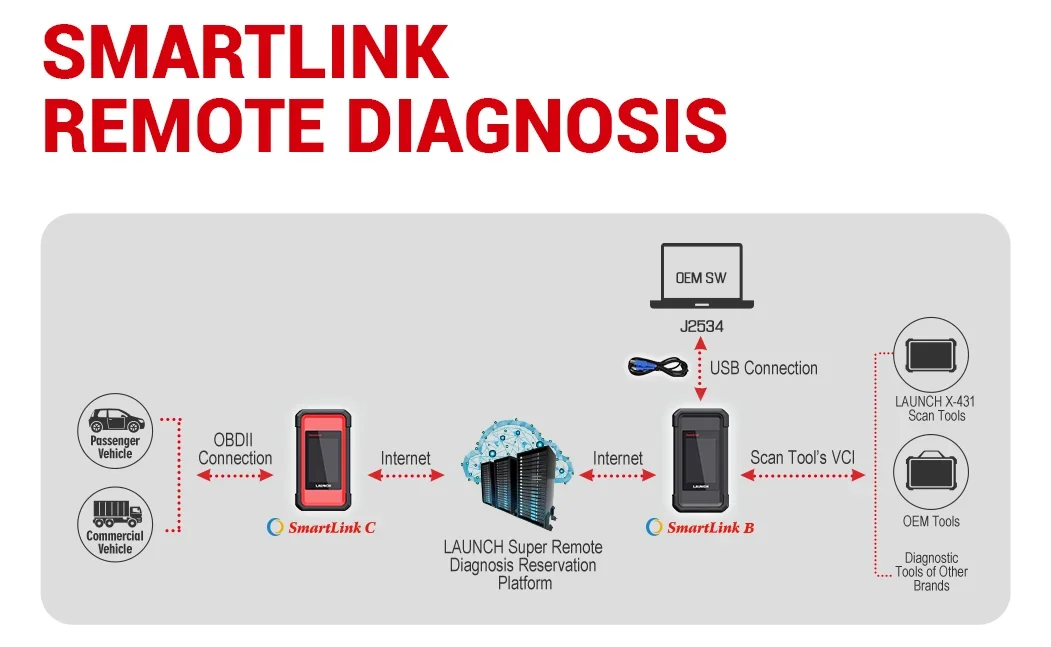
The LAUNCH SmartLink B V2.0 is a professional-grade remote diagnostic business terminal, designed to work as the service-provider side of the LAUNCH Super Remote Diagnosis (SRD) ecosystem. Built for remote engineers, master technicians, and diagnostic service centers, SmartLink B enables real-time, expert-level remote vehicle diagnostics by connecting directly with SmartLink C users through the LAUNCH SmartLink Service Platform.
This advanced system transforms how workshops and experts collaborate—allowing diagnostics to be performed across cities or countries with stability, speed, and precision.
🌐 Efficient Super Remote Diagnosis Platform
The SmartLink Service Platform acts as the central bridge between SmartLink B (Business End) and SmartLink C (Client End).
-
SmartLink C users submit remote diagnostic requests
-
SmartLink B users receive, review, and accept repair orders
-
Diagnostics are performed remotely using professional diagnostic tools
-
Communication occurs through a secure, browser-based cloud platform
This structure allows instant expert access without requiring the technician to be physically present at the vehicle location.
📡 Enhanced Wi-Fi Connectivity & Hardware Stability
SmartLink B V2.0 is equipped with dual-band Wi-Fi (2.4GHz / 5GHz) to ensure:
-
Faster data transmission
-
Reduced signal interference
-
Stable long-duration remote sessions
Compared to SmartLink 1.0, V2.0 offers major hardware upgrades:
-
Stronger and more stable Wi-Fi signal
-
Improved internal heat dissipation for extended working hours
-
Reinforced DB15 connector for more secure physical connections
These enhancements ensure uninterrupted performance during complex or time-intensive diagnostics.
🔍 Advanced Diagnostic Protocol Support
SmartLink B V2.0 supports modern and high-speed vehicle communication standards, including:
-
DoIP (Diagnostics over Internet Protocol)
-
CAN FD (Flexible Data Rate)
-
CAN 2.0
This allows technicians to diagnose new-generation vehicles, including those requiring Ethernet-based or high-bandwidth communication.
🔧 Broad Tool & Platform Compatibility
SmartLink B V2.0 is designed for maximum flexibility and integration:
-
Compatible with LAUNCH diagnostic tablets:
-
X-431 V+
-
X-431 PRO3
-
X-431 PRO3S
-
-
Can be connected to:
-
OE (Original Equipment) diagnostic tools
-
Third-party professional diagnostic tools
-
This makes SmartLink B an ideal solution for multi-brand service providers and remote diagnostic businesses.
🔁 Remote & Local Diagnostic Functionality
SmartLink B is not limited to remote use only.
-
Supports remote diagnostics via SmartLink Service Platform
-
Supports local diagnostics when paired with compatible LAUNCH intelligent diagnostic tools
This dual-function capability maximizes ROI and operational flexibility for workshops and mobile diagnostic engineers.
🔐 Activation Requirement (Important)
⚠️ SmartLink B V2.0 requires an official LAUNCH activation card to enable remote diagnosis functionality.
-
Activation grants access to the SmartLink Service Platform
-
Subscription validity depends on the activation plan purchased
-
Renewal is required after expiration to continue remote services
🧠 LAUNCH SmartLink Service Platform Overview
The LAUNCH SmartLink Service Platform is a cloud-based browser system used to:
-
Pair SmartLink B and SmartLink C devices
-
Manage remote diagnosis requests
-
Accept or decline service orders
-
Perform live remote vehicle diagnostics
Workflow Summary:
-
SmartLink C user posts a remote diagnosis request
-
SmartLink B user logs in via web browser
-
Request is accepted
-
Remote diagnostic session begins
This system enables professional diagnostics without geographic limitations.
🏆 Why Choose LAUNCH SmartLink B V2.0?
-
Designed specifically for remote diagnostic service providers
-
Supports latest vehicle communication protocols
-
Stronger connectivity and thermal performance than V1.0
-
Works with LAUNCH, OE, and third-party diagnostic tools
-
Scalable solution for workshops, fleets, and diagnostic businesses
🔑 How to Activate LAUNCH SmartLink B V2.0 Remote Diagnosis (Step-by-Step)
The LAUNCH SmartLink B V2.0 uses the official LAUNCH Super Remote Diagnosis Reservation Platform for activation and service management. Activation is mandatory to provide remote diagnostic services.
🌐 Network Requirement (Important)
To ensure stable and professional remote diagnostic performance:
-
Recommended Network Bandwidth: 100 Mbps
-
Minimum Upload / Download Speed: 10 Mbps
✅ Main Activation Workflow
Register → Log In → Accept Remote Diagnostic Requests
📝 Step 1: Platform Registration
-
Visit the official platform:
http://smartlink.x431.com/login -
Enter your email address and click “Get verification code”
-
The system will send a verification code to your email
-
Enter the verification code to complete registration
📌 Important:
-
The Product Serial Number (S/N) and Activation Code (A/C) are printed on the rear label of the SmartLink B device
-
These must be entered during device binding
🔐 Step 2: Log In & Add Device
-
Log in using your registered email
-
If you own multiple SmartLink devices, click “Add a device”
-
Enter:
-
Product Serial Number (S/N)
-
Activation Code (A/C)
-
Once completed, your SmartLink B V2.0 will appear in the device list.
📥 Step 3: Accept Remote Diagnostic Requests
After login, the platform will display available remote diagnosis requests from SmartLink C users.
Each request shows:
-
Vehicle details
-
Diagnostic mode
-
Client location and issue description
🔧 Available Remote Diagnosis Modes
-
SmartLinkB_xxxxxx
→ Perform remote diagnosis directly using SmartLink B hardware -
J2534 Remote Diagnosis
→ Requires OEM software + LAUNCH Tech J2534 driver installed on your PC
Choose the request that matches your expertise and accept it.
📞 Step 4: Client Communication
-
Once a request is accepted, you will receive client contact details
-
Guide the client step-by-step to resolve the issue remotely
-
Monitor:
-
Vehicle voltage
-
Network latency
-
Device online status
directly from the SmartLink platform
-
✅ Step 5: Complete or Exit Task
-
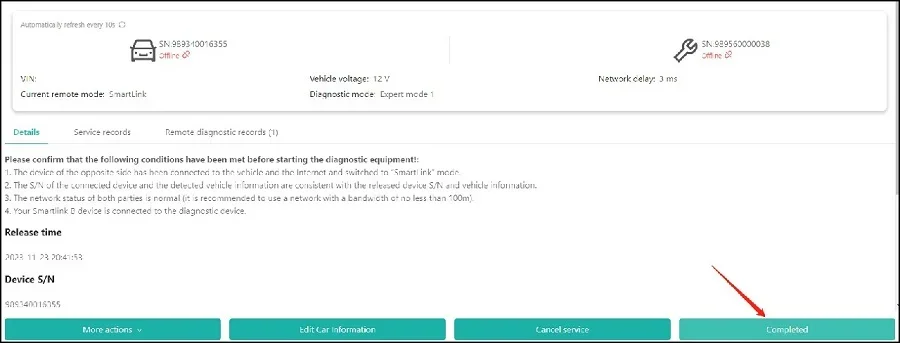
Click “Completed” after successfully fixing the issue
-
Click “Give up” if the issue cannot be resolved
All records are automatically saved.
📊 Step 6: Diagnostic History
-
Access “History Task” on the main dashboard
-
Review previous remote sessions, results, and client records
🧠 How SmartLink B Users Provide Remote Diagnostic Services
🔗 Creating a Remote Connection
Mode 1: Connection Code
-
SmartLink B user receives a 6-digit connection code from the SmartLink C (vehicle side)
-
Enter the code on the SmartLink platform to establish connection
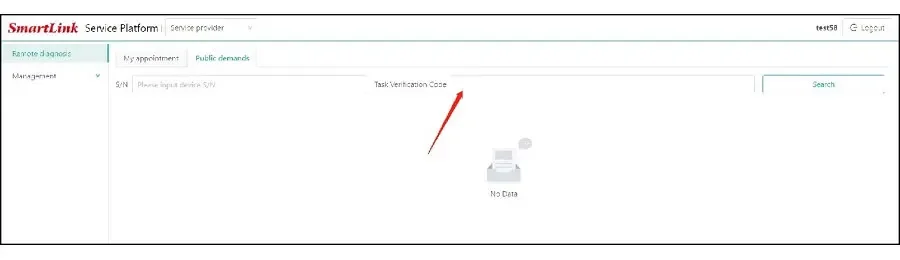
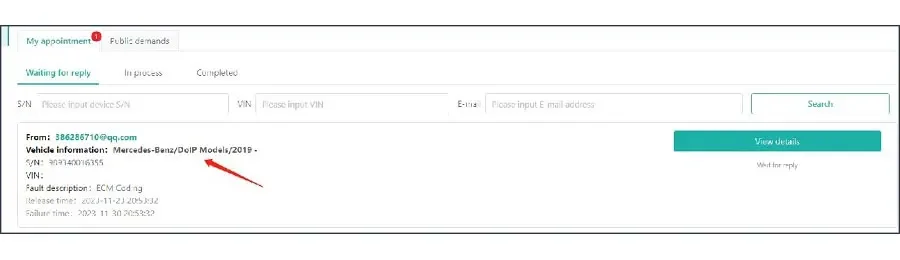
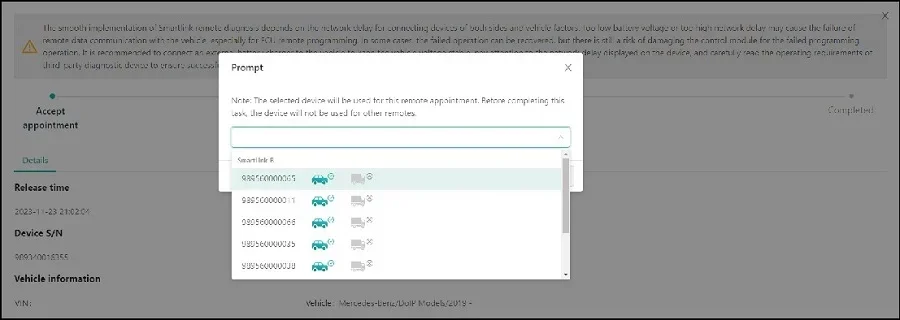
2. the Smartlink B power on, connects to the network and diagnosis devices
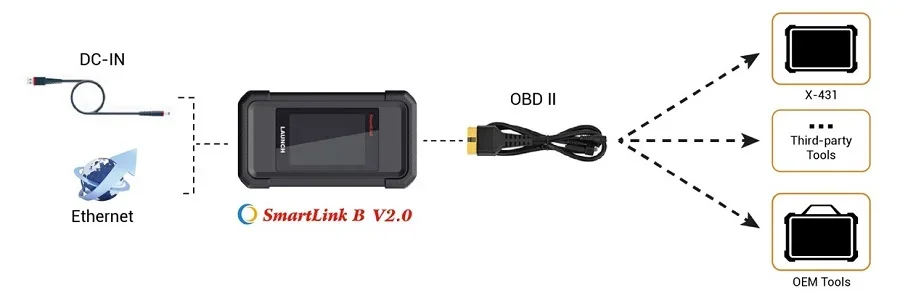
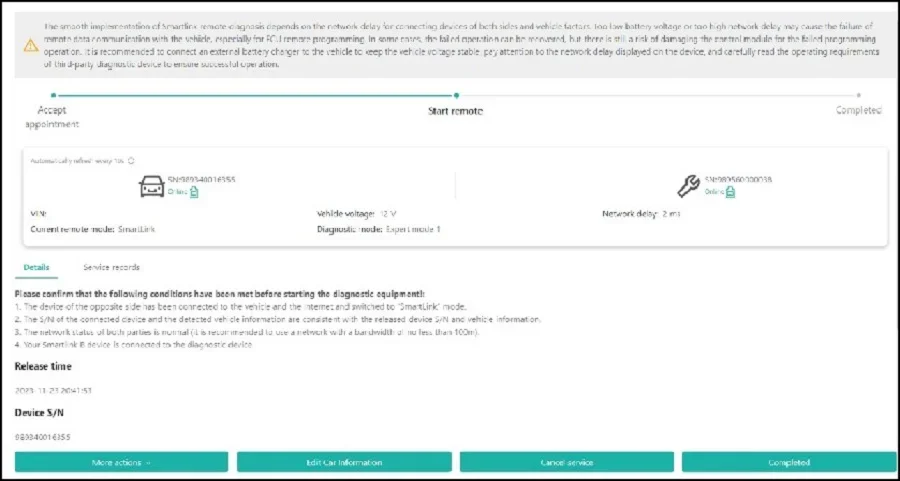
3. Once the connection is ready, you can operate the diagnostic device to start remote diagnosis.the online status of the devices, vehicle voltage, network delay can be shown on the Smartlink platform.
4. End remote diagnostic connect
After the remote diagnosis is completed, enter the test results to end the task.
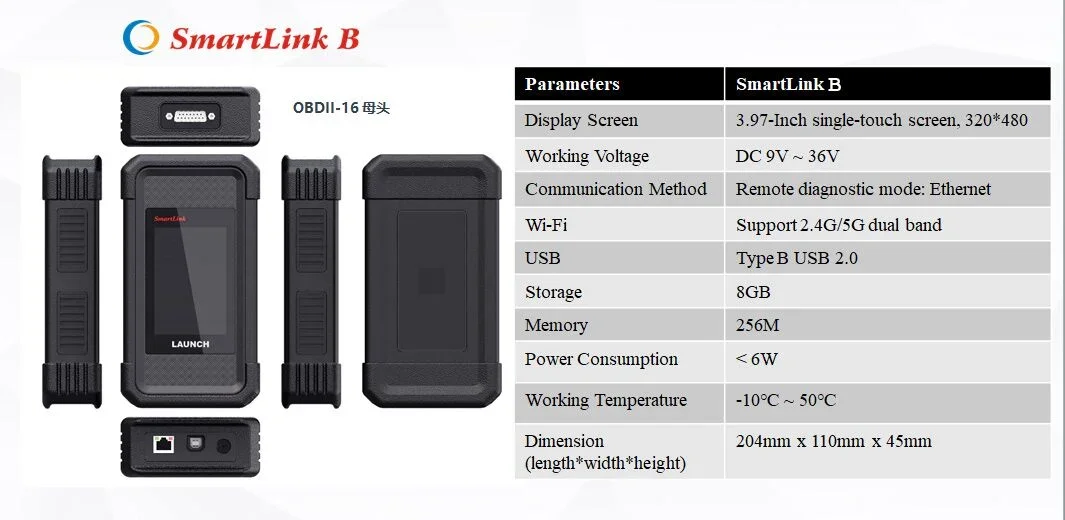
SmartLink B Specification
Display Screen:3.97-Inch single-touch screen, 320*480
Working Voltage:DC 9V ~ 36V
Communication Method:Remote diagnostic mode: Ethernet
Wi-Fi:Support 2.4G/5G dual band
USB:Type B USB 2.0
Storage:8GB
Memory:256M
Power Consumption:< 6W
Working Temperature: -10℃ ~ 50℃
Dimension (length*width*height) :204mm x 110mm x 45mm
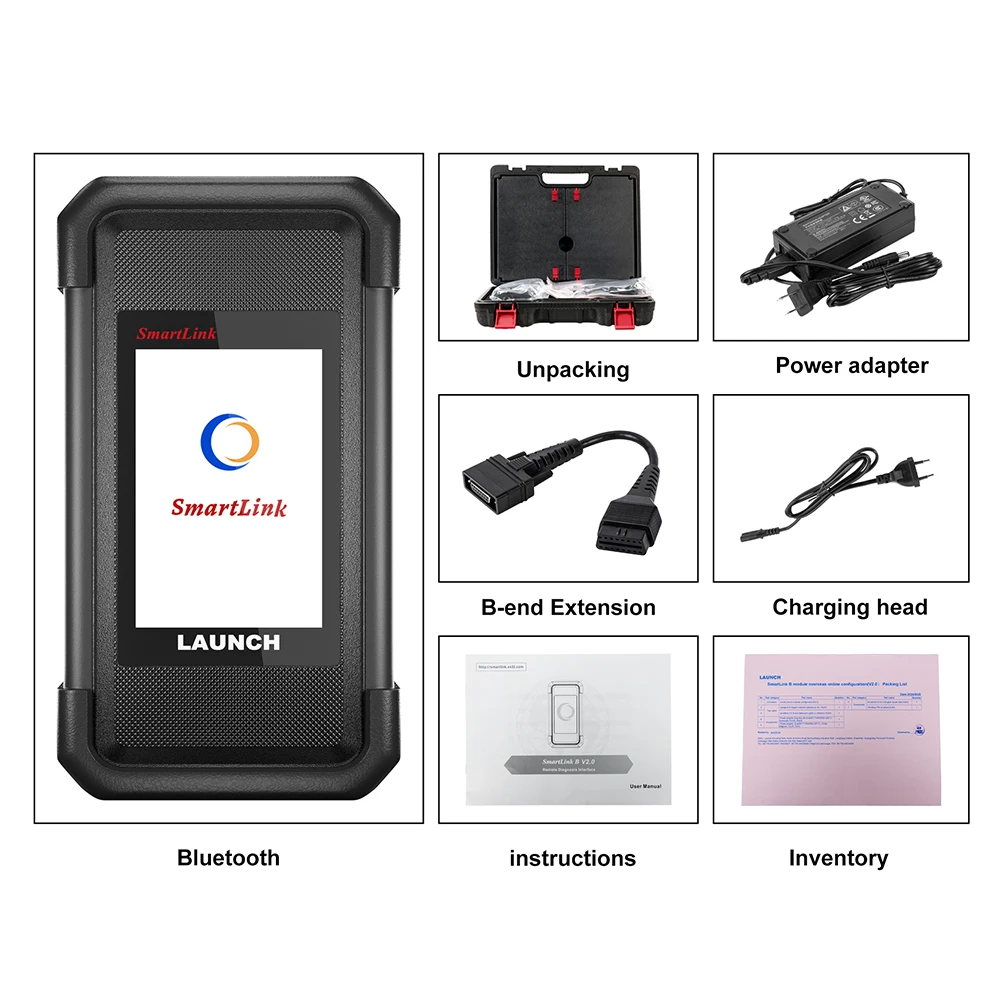
Packing List
-
Bluetooth
-
Unpacking
-
Power adapter
-
B-end Extension
-
Charging head
-
Instructions
-
Inventory
⚙️ Device Operation Flow
-
Power on SmartLink B
-
Connect to the internet and diagnostic tools
-
Establish remote connection
-
Perform diagnostics using connected LAUNCH / OE / third-party tools
-
End session and submit test results
📐 SmartLink B V2.0 Technical Specifications
🔧 Core Hardware
-
CPU: Dual-core Cortex-A7 + Cortex-M7
-
Operating System: Android 10.0
-
RAM: 256MB
-
ROM / Storage: 8GB
🖥️ Display
-
Screen Size: 3.97-inch TFT
-
Resolution: 320 × 480
-
Touch: Single-touch
🔌 Connectivity & Interfaces
-
Ethernet: RJ45 (Remote Diagnosis Mode)
-
Wi-Fi: 2.4GHz / 5GHz Dual-Band
-
USB: Type-B USB 2.0
-
OBD Interface: OBD II-16
-
Power Port: DC-IN
⚡ Electrical & Environmental
-
Working Voltage: DC 9V – 36V
-
Power Consumption: < 6W
-
Working Temperature: -10℃ to 50℃
📏 Physical Size
-
Dimensions: 204 × 110 × 45 mm
📦 Packing List
-
1 × LAUNCH X431 SmartLink B V2.0
-
Built-in Battery Included
-
Supports 105℃ industrial-grade standard
🚗 Supported Software & Vehicle Types
-
Passenger Cars
-
Trucks
-
Buses
-
Construction & Agricultural Machinery
🔄 Compatibility with LAUNCH Tablets
Works seamlessly with:
-
LAUNCH X431 V+
-
LAUNCH X431 PRO3
-
LAUNCH X431 PRO3S Series
🚀 Advanced Connectivity & Diagnostic Capabilities
The LAUNCH SmartLink B V2.0 is engineered for professional remote diagnostic service providers. Its powerful dual-processor architecture ensures fast response times, while Android 10.0 provides stability, security, and long-term software support. With Ethernet-based remote diagnostics and dual-band Wi-Fi, it delivers consistent performance even during long sessions.
🧩 Intuitive Interface & Professional Workflow
The high-visibility 3.97-inch TFT screen, combined with cloud-based management, allows technicians to manage multiple diagnostic jobs efficiently. Real-time monitoring of vehicle voltage, device status, and network delay ensures accurate and safe remote operations.
🏆 Why Choose LAUNCH SmartLink B V2.0?
-
Official LAUNCH Super Remote Diagnosis business terminal
-
Designed for remote experts & diagnostic service providers
-
Supports latest protocols: DoIP / CAN FD / CAN 2.0
-
Works with LAUNCH, OE, and third-party tools
-
Stable, scalable, and future-ready remote diagnostic solution
