


One Year Online Update for Launch X431 IMMO Plus Key Programmer Subscription
Couldn't load pickup availability
Return policy
Our goal is for every customer to be totally satisfied with their purchase. If this isn't the case, let us know and we'll do our best to work with you to make it right.
Shipping
We will work quickly to ship your order as soon as possible. Once your order has shipped, you will receive an email with further information. Delivery times vary depending on your location.

One Year Online Update Service for Launch X431 IMMO Plus Key Programmer — (Subscription Only)
- This is a one-year renewal service card — after the device's free update period expires you can buy this service to extend another one year of official updates.
- Available for Launch X431 IMMO Plus. No shipping required.
Product Overview
One Year Online Software Update Service for Launch X431 IMMO Plus Key Programmer (Subscription Only)
If your device’s free update service has expired, purchase this subscription to extend your official software updates for one additional year. Activation is digital — no shipment required.
Service Details
Important Notes
- Before purchase, provide the Serial Number so we can confirm eligibility. Devices bought from unauthorized overseas dealers may not be supported.
- This listing is for a One Year update subscription only.
- No shipping — activation is applied online to your serial number.
- Launch technicians usually complete activation within 24 hours.
How to Get the Subscription Renewal Service
- Place your order and complete checkout on our website.
- After purchase, please send your device Serial Number (SN) (a photo of device back is preferred).
- We will request a one-year update authorization be applied to your SN.
- The Launch technician will enable the update service online — no shipment required.
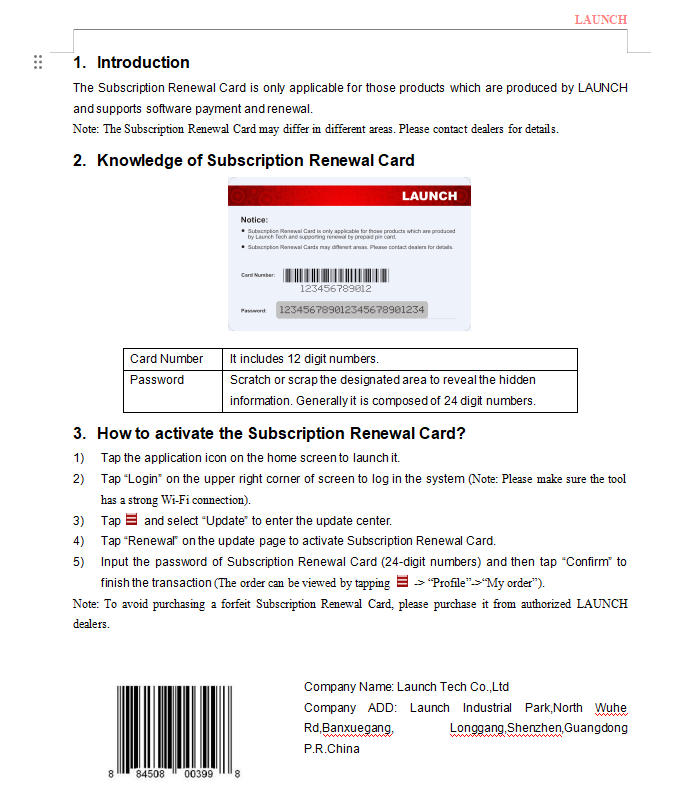
- You will receive the Subscription Renewal Card (Card Number + Password) by email.
How to Activate the Subscription Renewal Card
- Tap the X431 application icon on the home screen to launch it.
- Tap "Login" in the upper-right corner (ensure a strong Wi-Fi connection).
- Open: X431 Launch App → Software Update → Renewal.
- Choose Use Renewal Card → Renew Standard Software Configuration.
- Click Confirm (lower-right corner).
- Enter the 24-digit activation code from the renewal card or email, then submit.
Ready to renew? After checkout, please send your device Serial Number (SN) so we can verify eligibility and activate your one-year update quickly.